How to Read Email Headers
Email headers provide information for a specific email, including the sender, recipient, and delivery path (among others). Reading email headers helps establish the path a message followed from sender to recipient. Also, email providers use various email headers to recognize spam mail and to determine the legitimacy of a sent message. Headers help protect recipients from email scams and viruses. For more email header content, click here.
Check out the below example to gain a better understanding of how to read email headers. In this example, we used a received message in Google's Gmail client.
Note: Always review the "Received" headers in reverse chronological order (bottom to top). This practice tells you who sent the email and where it originated.
1. Access and view the message's headers. Click the three (3) vertical dots to expand the email's information menu. Click the "Show original" option in the dropdown.
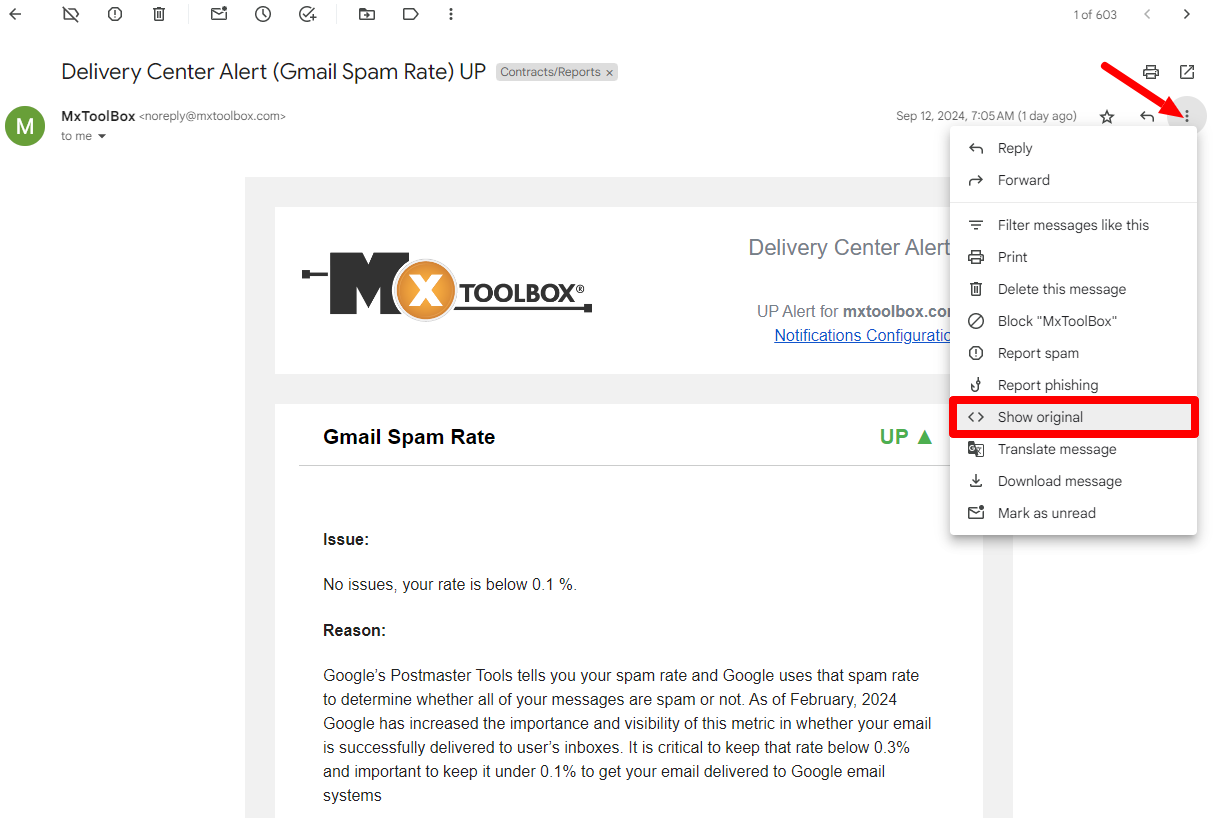

2. Determine who sent the email by finding the first/bottom "Received" header. Email headers are listed in reverse chronological order, so the bottom header provides important information about the original sender (e.g., email address, date/time the message was sent, and server/domain intel).

3. Confirm that you are the correct recipient. If you think you received the message in error, the "To" header verifies that your email address matches what the sender entered.

To review other email headers associated with a message, simply examine the information provided by the "Show original" view in Step 1.